
Buying the best second hand MacBook does not always require spending more than ₹1 lakh on a new device. A carefully inspected pre-owned model can provide excellent performance, dependable battery life and access to the Apple ecosystem at a considerably lower cost.
However, choosing the right MacBook involves more than comparing prices. Buyers must consider the processor, model year, memory, storage, battery condition, software compatibility and repair history. A device that looks affordable today may become expensive if it requires a battery, display or logic-board replacement shortly after purchase.
This guide explains which MacBook models offer the strongest value in 2026 and which factors should influence your buying decision.
Best Second Hand MacBook Options for Different Users
The right MacBook depends primarily on the applications you use and the performance you expect. A student preparing presentations does not need the same configuration as a video editor working with 4K footage.
For most buyers in 2026, an Apple silicon MacBook is a better long-term choice than an older Intel-based model. Apple began introducing its own Mac processors in late 2020, starting with devices such as the M1 MacBook Air and 13-inch M1 MacBook Pro.
Apple silicon models generally offer:
- Better power efficiency
- Longer practical battery life
- Lower operating temperatures
- Strong everyday performance
- Better compatibility with newer macOS features
- A longer useful software-support window
Intel models may still suit highly specific software requirements. Nevertheless, most students, professionals, developers and creators will receive better long-term value from an M1 or newer MacBook.
MacBook Air M1 as the Best Overall Value
The MacBook Air M1, introduced in 2020, remains one of the most practical second-hand MacBooks for everyday users. It is lightweight, silent and capable of handling office work, online classes, coding, browsing, content writing and moderate creative workloads.
Because the M1 Air uses a fanless design, it operates quietly. At the same time, its processor remains powerful enough for applications such as Microsoft Office, Google Workspace, Canva, basic Photoshop, programming tools and light video editing.
It is particularly suitable for:
- College and university students
- Content writers and digital marketers
- Office and remote-working professionals
- Beginner developers
- Freelancers
- First-time macOS users
An 8GB RAM and 256GB SSD model can meet standard productivity needs. However, a 16GB RAM version is preferable for software development, multitasking and longer ownership. Buyers who store large media files should consider 512GB storage or use a reliable external SSD.
The M1 MacBook Air remains compatible with recent macOS generations, making it more attractive than many Intel MacBook Air models from a similar period. Apple’s current compatibility guidance continues to include Apple silicon MacBook Air models introduced in 2020 or later.
Best Second Hand MacBook Pro for Professional Work
Professionals who run demanding applications should consider the 14-inch MacBook Pro with the M1 Pro chip. Although it costs more than a used MacBook Air, it offers a stronger processor, active cooling, an advanced display and a wider selection of ports.
The M1 Pro model is well suited to:
- Video editing
- Motion graphics
- Music production
- Graphic design
- Software development
- 3D and professional creative applications
- Heavy multitasking
A configuration with 16GB unified memory and 512GB storage is a strong starting point. Moreover, professionals working with large video projects, virtual machines or complex development environments may benefit from additional memory and storage.
The 14-inch M1 Pro MacBook Pro also includes practical connectivity options such as HDMI, an SD card slot and MagSafe charging. Therefore, many creators can connect cameras, displays and storage devices without relying heavily on adapters.
The 13-inch M1 MacBook Pro is another available option. However, it provides a smaller performance advantage over the M1 Air for ordinary users. Consequently, it is worth buying only when its condition and price are significantly better than an equivalent Air.
MacBook Air M2 for Portability and Modern Design
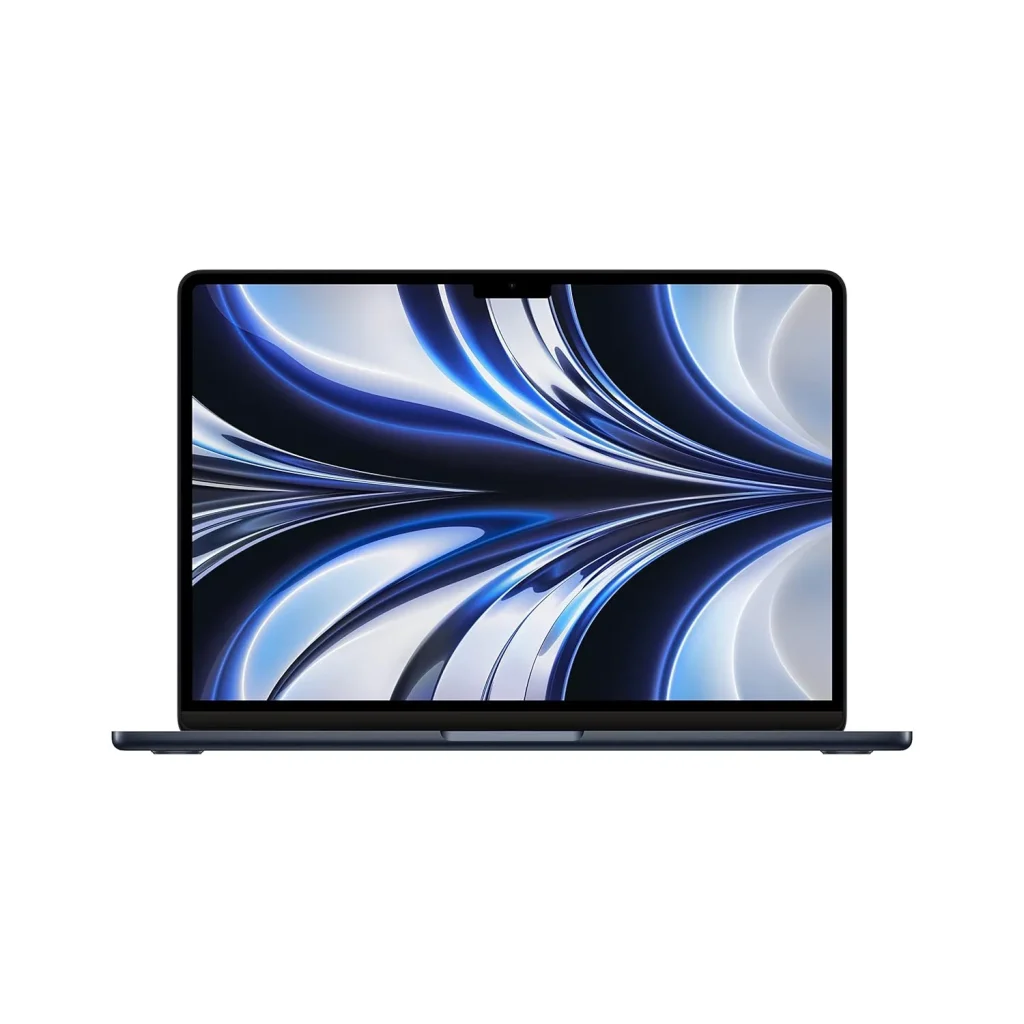
The M2 MacBook Air is a suitable choice for buyers who want a newer appearance, a brighter display, MagSafe charging and a more modern chassis.
It delivers enough performance for:
- Business applications
- Coding and web development
- Social media management
- Photo editing
- Full HD video editing
- Presentations and remote meetings
- General professional use
While the M2 chip improves performance, buyers should not choose it only because it is newer. A well-maintained M1 Air with 16GB RAM may provide better practical value than an M2 Air with 8GB RAM, particularly for multitasking.
Therefore, compare the entire configuration rather than focusing only on the processor generation. Memory, storage, battery health and device condition often have a greater effect on long-term usability.
Choosing Between MacBook Air and MacBook Pro
MacBook Air models prioritise portability, battery efficiency and everyday productivity. In contrast, MacBook Pro models are designed for sustained professional workloads.
Choose a MacBook Air when you primarily need:
- Browsing and documentation
- Online classes
- Office applications
- Basic programming
- Client meetings
- Lightweight photo or video editing
- Easy portability
Choose a MacBook Pro when your work includes:
- Long video exports
- Advanced photo editing
- Music production
- Application development
- Multiple external displays
- Large creative projects
- Sustained processor-intensive workloads
The best second hand MacBook is not necessarily the most powerful model available. Instead, it is the model that meets your workload without making you pay for performance you will rarely use.
Intel MacBook Models That Require Careful Evaluation
Older Intel MacBooks often appear attractive because of their lower prices. However, buyers should approach them carefully in 2026.
Apple’s recent operating-system compatibility has increasingly prioritised Apple silicon models. For example, Apple’s macOS compatibility guidance includes Apple silicon MacBook Air models from 2020 onward, while only a limited number of late Intel-based MacBook Pro models remain supported by certain recent releases.
An Intel MacBook may still make sense when:
- You need an Intel-specific application
- You require Windows through Boot Camp
- The purchase price is exceptionally low
- You need it for basic and temporary use
- The device has been professionally inspected
- Replacement parts and repairs remain available
Nevertheless, very old Intel models may have shorter software support, weaker battery life, higher operating temperatures and greater repair risk. Apple generally provides parts and service for a minimum period after a product was last distributed, after which models may be classified as vintage or obsolete.
Therefore, buyers planning to use a MacBook for several years should generally prioritise M1 or newer models.
Best Second Hand MacBook Specifications by Profession
Configuration matters as much as the model name. Before purchasing, match the device to your actual workload.
Students and everyday users
A MacBook Air M1 with 8GB RAM and 256GB storage can support assignments, presentations, browsing, video calls, entertainment and basic coding.
However, students planning to study programming, design or media production should consider 16GB RAM.
Working professionals
For emails, spreadsheets, presentations, customer management software and remote meetings, an M1 or M2 MacBook Air is usually sufficient.
A 512GB SSD may be useful when the user stores documents, offline files and business applications locally.
Developers and coders
Developers should preferably choose at least 16GB unified memory. An M1 Air can support web development and general programming, whereas an M1 Pro MacBook Pro is more suitable for larger projects, emulators, containers and intensive development tools.
Before purchasing, verify whether all required development software supports Apple silicon.
Graphic designers and video editors
A designer working mainly in Photoshop, Illustrator, Figma or Canva may be comfortable with an M1 or M2 Air with 16GB memory.
However, video editors, motion designers and professionals working with heavier timelines should consider an M1 Pro or newer MacBook Pro with at least 16GB memory and 512GB storage.
Battery Health and Cycle Count Inspection

Battery condition is one of the most important checks when buying a used MacBook. A device may perform correctly while connected to a charger but provide poor backup during normal use.
Apple allows users to check cycle count through System Information. Hold the Option key, open the Apple menu, select System Information and review the battery information under the hardware section.
During inspection, check:
- Battery health status
- Maximum capacity
- Cycle count
- Charging consistency
- Unexpected shutdowns
- Battery swelling
- “Service Recommended” warnings
Apple states that a normal Mac laptop battery is designed to retain up to 80% of its original capacity at its maximum cycle count under normal operating conditions.
A low cycle count is generally positive, although it does not guarantee that the battery is healthy. An old battery that has remained unused for long periods can still deteriorate. Therefore, check both the capacity and cycle count rather than relying on one number.
Physical and Functional Checks Before Payment
A proper inspection can prevent costly repairs later. Do not complete the purchase after checking only the external appearance.
Inspect the following areas carefully:
- Display for dead pixels, lines, flickering and discolouration
- Keyboard for unresponsive, repeated or sticky keys
- Trackpad for smooth clicking and gesture support
- Speakers and microphones
- Webcam quality
- Charging port and charging adapter
- USB-C, Thunderbolt, HDMI and SD card ports where applicable
- Wi-Fi and Bluetooth connectivity
- Touch ID
- Hinges and screen alignment
- Bottom panel screws
- Dents, gaps or signs of previous opening
- Liquid-damage indicators where accessible
Additionally, run the device for at least 20 to 30 minutes. Open multiple applications, play a video, test the speakers, connect to Wi-Fi and observe whether the MacBook overheats or restarts unexpectedly.
A few light scratches may be acceptable on a second-hand device. In contrast, a bent chassis, loose hinge, screen pressure marks or charging problems can indicate more serious damage.
Serial Number, Activation Lock and Ownership Checks
Before buying a second hand MacBook in India, verify that the seller has removed the device from their Apple Account and disabled Find My Mac.
The MacBook should not request the previous owner’s password during setup. Moreover, it should not carry an organisation’s remote-management profile unless the authorised organisation is selling it with proper documentation.
Ask the seller to erase the MacBook and complete the initial setup in your presence. You should be able to connect it to the internet and reach the normal setup screen without encountering an Activation Lock or remote-management restriction.
Also verify:
- Serial number in About This Mac
- Serial number on the device body
- Original invoice, when available
- Warranty or AppleCare status
- Seller’s identity and purchase proof
- Model year and exact configuration
Apple recommends erasing personal data and preparing a Mac before it is transferred or traded. Therefore, a seller who refuses to reset the device should be treated cautiously.
Used Versus Certified Refurbished MacBooks
A used MacBook is generally sold in its existing condition by an individual or reseller. It may or may not have undergone complete testing.
A professionally refurbished MacBook should typically go through inspection, cleaning, performance testing and repair where required. However, the meaning of “refurbished” varies between sellers. Therefore, buyers should examine what the seller actually provides instead of relying on the label.
A dependable refurbished-device seller should offer:
- A written warranty
- A clear return or replacement policy
- Battery-health disclosure
- Detailed configuration information
- GST invoice where applicable
- Functional testing
- Transparent cosmetic grading
- Support after purchase
A certified or professionally tested device may cost more than a privately sold unit. Nevertheless, the additional warranty and inspection can reduce risk, particularly for first-time buyers.
Models to Avoid or Buy Only at a Major Discount
Not every affordable MacBook represents good value. Avoid devices that show signs of serious damage or cannot support your required applications.
Exercise additional caution with:
- Very old Intel MacBook Air models
- MacBooks with swollen batteries
- Devices showing Activation Lock
- Devices controlled through unknown remote-management profiles
- MacBooks with display lines or backlight problems
- Models with unreliable keyboards
- Devices that restart under load
- MacBooks without verifiable serial numbers
- Systems with repaired or poorly fitted body panels
- Units sold without any testing period or warranty
Also avoid paying a premium only for a “Pro” label. A newer M1 MacBook Air can outperform or outlast several older Intel MacBook Pro configurations in everyday use.
Final Recommendation for Second-Hand Buyers
For most users, the best second hand MacBook in 2026 is the MacBook Air M1. It offers a strong balance of performance, portability, battery efficiency, software compatibility and resale value.
Users who want a newer design can consider the M2 MacBook Air. Meanwhile, developers, editors, designers and other power users should evaluate the 14-inch MacBook Pro with M1 Pro or a newer Pro-series chip.
Regardless of the model, buyers should prioritise:
- Apple silicon over older Intel processors
- At least 16GB memory for professional workloads
- Healthy battery condition
- Current software compatibility
- A verified serial number and ownership status
- A written warranty or testing period
- A reputable seller with a clear return policy
Ultimately, a well-maintained and correctly configured MacBook is more valuable than a newer device with poor battery health, hidden repairs or insufficient memory.
Common Questions About Buying a Used MacBook
Which is the best second hand MacBook to buy in 2026?
The M1 MacBook Air is the best overall option for most students, freelancers and working professionals. It provides reliable performance for productivity, coding, meetings and moderate creative work. For heavier video editing or development, the 14-inch M1 Pro MacBook Pro offers stronger sustained performance.
Is an M1 MacBook still worth buying in 2026?
Yes. An M1 MacBook remains suitable for general productivity, coding, office work and light creative tasks. Apple’s current compatibility information continues to include Apple silicon MacBook Air and MacBook Pro models introduced from 2020 onward.
Is it safe to buy a second hand MacBook in India?
It can be safe when the device is properly tested and purchased from a reliable seller. Buyers should verify the serial number, battery health, Activation Lock status, physical condition, repair history, invoice and warranty terms before making payment.
How much battery health is acceptable in a used MacBook?
A battery with 85% or higher maximum capacity is generally preferable for a used MacBook. Capacity below 80% may indicate that a battery replacement should be considered soon. However, buyers should also inspect cycle count, charging behaviour and the battery-health status shown by macOS.
Should I buy an Intel or Apple silicon MacBook?
Apple silicon is the better choice for most buyers because it offers stronger efficiency, better performance per watt and broader compatibility with recent macOS versions. An Intel MacBook should mainly be considered for specialised software, Boot Camp support or a significantly lower purchase price.
Is 8GB RAM sufficient for a second-hand MacBook?
Eight gigabytes can support browsing, office applications, online classes and basic coding. However, 16GB is recommended for development, editing, design, multitasking and longer-term ownership because memory cannot be upgraded after purchase.
Is a used MacBook better than a refurbished MacBook?
A used MacBook may cost less, but its condition depends heavily on the previous owner. A professionally refurbished MacBook may provide better quality assurance, functional testing and warranty support. The stronger option depends on the seller’s transparency, inspection process and after-sales policy.